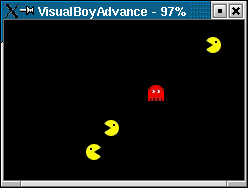
One describes the main parts of the code of a demo of a small preys-predators system implemented for the GBA platform. A predator moves using the arrow keys. Preys are running away from predators and are killed when a predator is sufficiently close to them. New preys are automatically created. A predator is put in an automatic chasing mode with key 'a' and returns in the manual mode with 'b'. More predators can be created with 'l', and more preys with 'r'. A screenshot of the demo running on the VisualBoyAdvance emulator is shown on figure Demo. The predator is the ghost and the preys are the pacmans. This demo is available at the Web site http://www.gbadev.org.
1 Sprites |
sprite_t is defined on figure
Sprites.
typedef struct
{
    s16       x;
    s16       y;
    s16       sx;
    s16       sy;
    u8        index;
    thread_t *behaviors;
    u8        behav_num;
    event_t   destroy;
    u8        dead;
}
struct_sprite_t, *sprite_t;
The types
s16 and u8 are integer types (actually,
signed 16 bits, and unsigned 8 bits). Fields x and y are the sprite coordinates. sx and sy define
the speed vector of the sprite. index is the index of the
sprite in the table where sprites are stored. behaviors is
an array of threads in elementary behaviors of the
sprite can be stored. The size of behaviors is stored in
behav_num. The event destroy is used to signal the
destruction of the sprite. Finally, the boolean dead is used
to note that the sprite is destroyed.
Destruction |
destroy_sprite shown on figure
Destruction. First, all components of behaviors are stopped. Then, at the next instant, they are
deallocated (by thread_deallocate) with the sprite structure
itself. Finally, the executing thread (returned by self) is
deallocated.
module destroy_sprite (sprite_t s)
{
    int i;
    sprite_t s = local(s);
    for (i=0;i<s->behav_num;i++) stop (s->behaviors[i]);
}
cooperate;
{
    int i;
    sprite_t s = local(s);
    suppress_sprite (s->index);
    for (i=0;i<s->behav_num;i++) thread_deallocate (s->behaviors[i]);
    event_deallocate (s->destroy);
    free (s->behaviors);
    free (s);
    thread_deallocate (self ());
}
end module
Because of the
cooperate, threads are actually stopped at
instant N+1, and are deallocated at instant N+2 (remember thar calls to
stop and to thread_deallocate produce orders which
are not immediately processed, but are delayed to the next instant).
2 Keyboard |
create_key_events of figure
Create Key Events creates the 8 events needed.
void create_key_events (void)
{
    a_pressed     = event_create ();
    b_pressed     = event_create ();
    up_pressed    = event_create ();
    down_pressed  = event_create ();
    left_pressed  = event_create ();
    right_pressed = event_create ();
    r_pressed     = event_create ();
    l_pressed     = event_create ();
}
The purpose of the module
key_handler of figure Key Handler
is to convert at each
instant, the key press (obtained through
the function pressed_key) into the corresponding events
(remark that several keys can be simultaneously processed).
module key_handler ()
while (1) do
   {
      if (pressed_key (KEY_A))     generate (a_pressed);
      if (pressed_key (KEY_B))     generate (b_pressed);
      if (pressed_key (KEY_UP))    generate (up_pressed);
      if (pressed_key (KEY_DOWN))  generate (down_pressed);
      if (pressed_key (KEY_LEFT))  generate (left_pressed);
      if (pressed_key (KEY_RIGHT)) generate (right_pressed);
      if (pressed_key (KEY_R))     generate (r_pressed);
      if (pressed_key (KEY_L))     generate (l_pressed);
   }
   cooperate;
end
end module
The module
key_processing of Key Processing
associates a callback
(of type void (*callback_t) ()) to a key. 10 instants
are passed when a key press is detected, in order to give enough
time for the key to be released.
module key_processing (event_t key_pressed,callback_t callback)
while(1) do
   await (local(key_pressed));
   {
      local(callback) ();
   }
   repeat (10) do cooperate; end
end
end module
3 Elementary Behaviors |
Inertia |
inertia module of figure Inertia. In it, the sprite given in
parameter increments at each instant its coordinates according to its
speed.
module inertia (sprite_t s)
while (1) do
   {
      sprite_t s = local(s);
      s->x += s->sx/INERTIA_FACTOR;
      s->y += s->sy/INERTIA_FACTOR;
   }
   cooperate;
end
end module
Moves |
move_right of figure Move Right, a sprite moves
when the event right_pressed is present. Similar modules
are defined for the 3 other directions.
void go_right (sprite_t s,s16 dist)
{
   s->x += dist;
   if (s->x > MAX_BORDER_X) s->x = MAX_BORDER_X;
}

module move_right (sprite_t s,int dist)
while (1) do
   await (right_pressed);
   go_right (local(s),local(dist))
   cooperate;
end
end module
Collisions |
collide of
figure Collision. Collision detection is related to a
special event which is generated by all sprites subject to
collision. This event is generated by all these sprites, at
each instant.
The body of the module collide is an infinite loop in
which the collision event collide_evt is generated at each
instant. The sprite which generates the event is passed as value to
the generate_value function. Then, all generations of collide_evt are considered in turn, and the function collide is called for all (except of course itself) the generated
values, that are the other sprites. The return code becomes different
from OK (more precisely: ENEXT) when all the sprites are processed. This is
detected at the next instant, and there is thus no need of an explicit
cooperate to prevent the loop to be instantaneous.
static void collision (sprite_t s1,sprite_t s2)
{
   u16 dx = s2->x - s1->x;
   u16 dy = s2->y - s1->y;

   if (dist2 (s1,s2) > min_collision) return;

   s1->sx = -s1->sx;
   s1->sy = -s1->sy;

   if (dx>0) go_left (s1,dx); else go_right (s1,-dx);
   if (dy>0) go_up (s1,dy); else go_down (s1,-dy);
}

module collide (sprite_t me,event_t collide_evt)
local sprite_t other, int i, int exit;

while (1) do
    {
       local(i) = 0;
       local(exit) = 0;
    }
    generate_value(local(collide_evt), (void*)local(me));
    while(!local(exit)) do
        get_value (local(collide_evt),local(i), (void**)&local(other));
        {
           if (return_code () == OK) {
              if (local(me) != local(other)) collision (local(me),local(other));
              local(i)++;
           } else {
              local(exit) = 1;
           }
        }
    end
end
The collision function implements a very basic
algorithm which leads to some unrealistic moves\; it can of
course be replaced by more realistic (but more expensive!) collision
treatments. Moreover, each sprite considers all others sprites, at each instant
which is inefficient (complexity in the square of the number of sprites). The
algorithm could certainly also be improved in this respect.
4 Predators |
predator
shown in figure Predator Behavior.
module predator (sprite_t me,event_t pred_evt,event_t prey_evt)
local sprite_t other, sprite_t closest,
      int min, int i, int finished;

while (1) do
    {
       local(i) = 0;
       local(finished) = 0;
       local(min) = predator_visibility;
       generate_value (local(pred_evt), (void*)local(me));
    }
    while (!local(finished)) do
        get_value (local(prey_evt),local(i), (void**)&local(other));
        if (local(me)->dead) then return; end
        {
           if (return_code () == OK) {
              int d2 = dist2 (local(me),local(other));
              if (local(me) != local(other) && d2 < local(min)) {
                 local(min) = d2;
                 local(closest) = local(other);
              }
              local(i)++;
           } else {
               local(finished) = 1;
               if (local(min) < predator_visibility && !local(closest)->dead)
                          chase (local(me),local(closest));
           }
        }
    end
end

end module
At each instant, the event
pred_evt is generated by each
predator. It is a valued generation, in which the sprite is passed as
value. Then, all values associated to the event prey_event
are considered in turn. When a new value is available, one tests if
the sprite is dead (it could have been killed just before)\;
the behavior returns if it is the case. Otherwise, the return code
is considered:
- if it is OK, then
otherdenotes the other sprite. The distance to it is computed (actually, the square of it, returned bydist2), and if the other sprite is distinct from the sprite and closer than the one in the fieldclosest, thenclosestis changed. - otherwise, the closest prey is chased, provided it can be seen
by the predator (according to the global variable
predator_visibility) and provided it is still alive (according to itsdeathfield). Thedestroyevent of the prey is generated when it is killed.
predator_sprite and is defined in figure Predator Sprite.
It holds a local variable inertia which stores
the inertia thread giving the inertial behavior to the sprite.
Initially, inertial is suspended and the predator is thus
immobile. When receving the event a_pressed, inertia is resumed, and it is suspended again with b_pressed. Initially, an atomic action is first executed which
performs the following actions:
-
A new sprite
sis first created with a zero speed vector and a ghost aspect. - An instance of the module
predatoris created. The sprite and the eventspred_evtandprey_evtare passed to it. - Several threads are created, all of them taking
sas parameter: an instance ofsync_spriteto perform synchronisation of the sprite with the corresponding entry in the table of sprites\; four instances ofmoveto move the sprite in the 4 directions, according to 4 corresponding events\; an instance ofbounce_on_bordersto let the sprite bounce on the borders of the applet\; an instance ofcollideto let the sprite collide with other predators. - Finally, an instance of the module
inertiais created and assigned to the local variable with the same name. The instance is immediately suspended, using thesuspendfunction.
behaviors field of the sprite. Actually, only inertia will
be accessed after creation, and one use a special local variable to store it.
module predator_sprite ()
local thread_t inertia;
{
    sprite_t s = new_sprite (0,GHOST);

    predator_create (s,pred_evt,prey_evt);
    sync_sprite_create (s);
    move_right_create (s,pred_run_step);
    move_left_create (s,pred_run_step);
    move_up_create (s,pred_run_step);
    move_down_create (s,pred_run_step);
    bounce_on_borders_create (s);
    collide_create (s,pred_evt);

    local(inertia) = inertia_create (s);
    suspend (local(inertia));
}
while (1) do
   await (a_pressed);
   resume (local(inertia));
   cooperate;
   await (b_pressed);
   suspend (local(inertia));
   cooperate;
end
end module
5 Preys |
The prey sprite is defined in the module prey_sprite of
figure Prey Sprite. The overall behavior is made of the
specific one, called prey, an inertia behavior, a bouncing one, a
synchronisation behavior and a collision one. All these elementary
behaviors are stored in behaviors because they must be
destroyed when the prey is killed. The definition of the module
prey is very close to the one of predator, with 2 changes:
first, the events generated and observed are inverted\; second,
the chase function is changed by a function that make the prey
run away from the predator.
After creation of the elementary behaviors, the destroy
event is awaited (let us recall that it is generated when the prey is
killed by the the predator). Then, an instance of the destroy_sprite module is run in order to deallocate the various
behaviors of the prey, and finally the executing thread is
deallocated.
module prey_sprite ()
local sprite_t s;
{
    sprite_t s = new_sprite (0,PACMAN);
    alloc_behaviors (s,5);
    s->behaviors[0] = inertia_create (s);
    s->behaviors[1] = bounce_on_borders_create (s);
    s->behaviors[2] = prey_create (s,pred_evt,prey_evt);
    s->behaviors[3] = sync_sprite_create (s);
    s->behaviors[4] = collide_create (s,prey_evt);

    local(s) = s;
}
await (local(s)->destroy);
run destroy_sprite (local(s));
thread_deallocate (self ());
end module
6 Automatic |
automatic
of figure Automatic,
new preys are automatically created, after a while, when there is none
in the system. At each instant, the event generated by preys (prey_evt) is observed, using the get_value function. If
no value with index 0 is available, which means that no prey was
present during previous instant, then new preys are created.
Otherwise, the thread simply cooperates.
module automatic (int delay)
local sprite_t other;
while(1) do
    get_value (prey_evt,0, (void**)&local(other));
    if (return_code () == ENEXT) then
        repeat (local(delay)) do cooperate; end
        repeat (NUMBER_OF_PREYS) do prey_sprite_create (); end
        cooperate;
    end
    cooperate;
end
end module
7 Program |
GBA_main.
It is described in figure Main.
First, the two events generated at each instant by preys and predators are
created. Then, events corresponding to keys are created with an instance
of the module key_handler which convert key presses into events.
An instance of automatic and one of predator_sprite are
created. Finally, some global variables are set to correctly parametrize the demo.
module GBA_main()
{
    prey_evt = event_create ();
    pred_evt = event_create ();

    create_key_events ();
    key_handler_create ();

    automatic_create (CREATION_DELAY);
    predator_sprite_create ();

    key_processing_create (l_pressed,predator_sprite_create);
    key_processing_create (r_pressed,prey_sprite_create);

    max_pred_speed      = 10;
    kill_dist2          = 200;
    predator_visibility = 40000;
    pred_run_step       = 2;

    max_prey_speed      = 30;
    prey_visibility     = 8000;
    prey_run_step       = 3;
}
end module